



A successful corporate video starts long before the cameras begin rolling. From setting clear objectives and planning the creative approach to filming, editing and delivery, every stage plays a role in producing content that communicates your message effectively.
Whether you’re creating a company profile, promotional video, recruitment campaign or internal communication, following a structured production process helps keep the project organised and ensures the finished video meets your business goals. This guide walks through each stage of corporate video production, explaining what happens at every step and why it matters.
Step-by-Step: Shooting a Corporate Video from Start to Finish – An Overview
Producing a corporate video typically involves:
- Defining the purpose and key messages
- Understanding the target audience
- Developing the creative concept
- Writing the script and storyboard
- Organising the production
- Filming the video
- Capturing supporting footage (B-roll)
- Editing and refining the story
- Reviewing the final version
- Delivering and distributing the video
Let’s look at each stage in more detail.
Step 1: Define the Purpose of the Video
Every successful corporate video begins with a clear objective. Before planning the creative direction, decide what the video needs to achieve and what action you want viewers to take after watching.

Your objective may be to:
- Introduce your business to prospective clients
- Promote a product or service
- Support employee recruitment
- Explain internal processes
- Deliver workplace training
- Strengthen relationships with existing customers
Once the objective has been established, identify two or three key messages you want viewers to remember. Trying to communicate too much in a single video can reduce its impact, so keep the messaging focused and consistent.
It’s also important to define the desired outcome. For example, you may want viewers to contact your business, visit your website, enquire about a service or simply gain a better understanding of your organisation. This goal should guide every stage of production.
Tips:
- Identify one clear objective.
- Focus on two or three key messages.
- Decide what action viewers should take after watching.
A clearly defined purpose provides direction for the entire production process.
Step 2: Understand Your Audience
The most effective corporate videos are created with a specific audience in mind. Understanding who you’re speaking to helps shape the messaging, visuals and overall presentation.
Ask questions such as:
- Who is the target audience?
- What information do they need?
- What challenges or questions are they trying to solve?
- What style of communication will engage them?
The tone should also match the audience. A recruitment video may feel friendly and engaging, while an induction or training video is often more instructional. Likewise, a promotional video aimed at potential customers should differ from an internal communication designed for employees.
Tips:
- Tailor the language to your audience.
- Focus on the viewer’s needs rather than your business.
- Choose a tone that supports the video’s purpose.
Putting your audience first leads to clearer communication and stronger engagement.
Step 3: Develop the Creative Concept
With the objectives and audience established, the next step is deciding how the story will be presented. This creative concept, sometimes called the treatment, defines the video’s style, structure and overall tone.

Depending on your objectives, the production may include:
- Interview-style storytelling
- Vox pops featuring customers or staff
- Presenter-led segments
- Voiceover narration
- Motion graphics or animation
- A combination of live-action footage and graphics
The concept should support your key messages while presenting them in a way that feels engaging and appropriate for your audience. It’s also important to decide on the overall tone early in the process. Some corporate videos are educational and informative, while others are designed to inspire, reassure or generate excitement.
Every creative decision should reinforce your objectives and help guide viewers towards the intended outcome.
Tips:
- Select a presentation style that suits your audience.
- Decide early if interviews, presenters, voiceovers or animation will be included.
- Keep the visual style and tone consistent.
A well-developed concept creates a strong foundation for scripting and production.
Step 4: Write the Script and Build the Storyboard
A strong script provides the structure for the entire production. It ensures everyone involved understands the messaging, flow and intended outcome before filming begins.
Keep the script clear, concise and focused on your key messages. Rather than including everything about your business, prioritise the information that is most valuable to your audience.

Once the script is complete, create a storyboard or shot list that maps each scene to the visuals required. This helps the production team capture the right footage efficiently and reduces unnecessary retakes.
If the video includes interviews or vox pops, prepare the interview questions at this stage. Well-planned questions encourage natural responses while ensuring the conversation covers the topics needed to support the video’s objectives.
Planning the visuals in advance also highlights where supporting footage, graphics or animation may be needed.
Tips:
- Keep the script conversational and focused.
- Create a storyboard or detailed shot list.
- Prepare interview questions before filming.
A well-planned script and storyboard make filming more organised and editing more efficient.
Step 5: Organise the Production
With the creative planning complete, it’s time to prepare for filming. Good pre-production keeps the shoot running smoothly and helps avoid unnecessary delays on the day.
Preparation typically includes:
- Confirming filming locations
- Scheduling interviews and filming times
- Organising presenters, interviewees or on-screen talent
- Preparing camera, lighting and audio equipment
- Obtaining any required approvals and talent release forms
- Ensuring filming locations are safe, tidy and ready for production
- Coordinating staff availability
Creating a detailed production schedule gives everyone involved a clear understanding of the filming plan and helps the crew work efficiently.
Tips:
- Confirm locations and participant availability in advance.
- Obtain approvals and signed release forms before filming.
- Allow extra time for unexpected changes.
Careful preparation helps create a smoother, more productive filming day.
Step 6: Film the Video
Filming brings the planning to life. Every scene should align with the approved script and storyboard while clearly communicating the intended message.
Before recording begins, the crew sets up cameras, lighting and audio equipment to achieve the best possible picture and sound quality. During filming, attention is given to framing, continuity and performance to ensure the footage works together in the final edit.
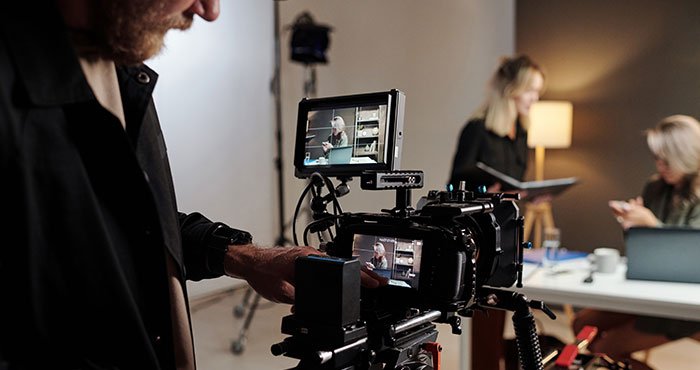
Depending on the project, filming may include:
- Interviews with staff or clients
- Presenter-led segments
- Workplace activities
- Product demonstrations
- Customer interactions
- Team collaboration
- Establishing shots of the business or location
Multiple takes are often recorded to provide greater flexibility during editing.
Tips:
- Check lighting and audio before every recording.
- Follow the storyboard while remaining adaptable.
- Capture additional takes of important scenes.
Professional filming captures both the planned content and authentic moments that strengthen the story.
Step 7: Capture Supporting Footage (B-roll)
Alongside the primary footage, crews record supporting footage, known as B-roll. These additional visuals add context, reinforce key messages and create smoother transitions throughout the video.
Depending on the project, B-roll may include:
- Employees performing daily tasks
- Team meetings and collaboration
- Equipment or machinery in operation
- Product demonstrations
- Customer interactions
- Office, warehouse or workplace facilities
- Exterior shots of the business
Capturing a variety of supporting footage gives editors greater flexibility and helps create a more engaging final video.
Tips:
- Record more B-roll than you expect to use.
- Capture a mix of wide, medium and close-up shots.
- Ensure every shot supports the story and key messages.
Strong B-roll enhances the final production by bringing the story to life visually.
Step 8: Edit and Refine the Story
Editing is where the footage comes together to form a clear, engaging story. This stage shapes the pacing, strengthens the messaging and ensures the finished video aligns with the original objectives.

During post-production, editors typically:
- Select the strongest footage
- Arrange scenes into a logical sequence
- Trim unnecessary content
- Balance and enhance audio
- Perform colour correction
- Add branding, titles and graphics
- Incorporate animation where required
- Refine transitions and pacing
If the creative concept includes voiceovers, music or motion graphics, these elements are also integrated during editing to create a polished final production.
Tips:
- Remove anything that doesn’t support the key message.
- Keep branding and graphics consistent.
- Review the edit several times before approval.
Thoughtful editing transforms individual clips into a professional video that communicates clearly and effectively.
Step 9: Review and Refine the Final Version
Before publishing, review the completed video carefully to ensure it reflects your brand and communicates the intended message.

Check that:
- The key messages are clear
- Branding, logos and graphics are accurate
- Audio levels are consistent
- Visual quality is professional
- Captions and on-screen text are error-free
- The video encourages the intended action
Gathering feedback from key stakeholders can help identify small improvements before the video is released. It’s also worth testing the video on different devices to ensure a consistent viewing experience.
Tips:
- Review the video from start to finish without interruption.
- Ask others to provide feedback before approval.
- Test playback across desktop, mobile and tablet devices.
A thorough review helps minimise revisions after publication.
Step 10: Deliver and Maximise the Value of Your Video
Completing the edit is only part of the process. Planning how the video will be distributed helps maximise its reach and long-term value.

Corporate videos can be used across a range of platforms, including:
- Company websites
- Social media channels
- Email marketing campaigns
- Sales presentations
- Recruitment initiatives
- Internal communications
- Conferences and industry events
Creating shorter edits for platforms such as LinkedIn, Instagram or YouTube can extend the video’s reach. Monitoring metrics such as views, engagement and enquiries also provides valuable insights for future productions.
Tips:
- Plan distribution before filming begins.
- Adapt the video for different platforms where appropriate.
- Review performance to improve future projects.
A considered distribution strategy helps your video continue delivering value long after production is complete.
Final Thoughts
Shooting a corporate video from start to finish requires careful planning, creative thinking and attention to detail. From defining your objectives and developing the creative concept through to filming, editing and distribution, every stage contributes to the quality of the finished production.
Following a structured workflow helps ensure your video communicates clearly, reflects your brand and achieves its intended purpose, whether you’re promoting your business, recruiting staff, delivering training or sharing important information.
Ready to Produce a Corporate Video That Reflects Your Business?
At Channel 1 Creative Media, we guide businesses and organisations through every stage of corporate video production. From defining objectives and developing creative concepts through to scripting, filming, editing and final delivery, our experienced team creates video content that informs, engages and inspires.
Whether you’re producing a company profile, promotional campaign, recruitment video or internal communications content, we’ll help you create a professional video that connects with your audience and supports your business goals.
Call us on (03) 8743 0488 or visit our Contact Us page to discuss your next corporate video project. We’d love to help bring your ideas to life through professional video production.