



The best training video isn’t just informative. It should be easy for employees to watch, understand and apply. Workplace teams can include people with different levels of experience, language backgrounds, abilities and accessibility needs. If important information is difficult to access or understand, the message can be lost.
So, how do you make training videos accessible for all employees? The answer starts with creating content that’s clear, inclusive and easy to follow from the beginning. While captions and transcripts are important, accessibility goes beyond individual features. It means reducing barriers that could prevent employees from learning, participating or carrying out their work safely and confidently.
When accessibility is built into your training videos from the start, the wider workforce can benefit from clearer communication and easier access to important information. Well-structured content can also support engagement, knowledge retention and consistent workplace practices.
In this guide, we’ll explore practical ways to make training videos accessible to a wider audience without compromising quality or effectiveness.
How to Make Training Videos Accessible for All Employees: A Quick Overview
Accessible training videos should:
- Include accurate captions
- Use clear, easy-to-understand language
- Present information at a comfortable pace
- Support spoken information with clear visuals
- Consider different accessibility needs
- Remain easy to access across multiple devices
The right approach will depend on your workforce, training content and viewing environment. The following strategies can help make your videos easier to understand and access.
Practical Ways to Make Training Videos More Accessible
Accessibility is not only about supporting employees with specific accessibility needs. Features such as captions, clear language, simple visuals and modular content can make training easier to access and understand across the wider workforce.
Think About Accessibility Before Production Begins
Accessibility should be part of the planning process rather than something added after the video is complete.

When developing your training, consider questions such as:
- Who will watch this video?
- Are employees working in different environments?
- Will some viewers rely on captions?
- Does the workforce include employees with varying literacy levels or language backgrounds?
- Will the video be viewed on mobile devices as well as desktop computers?
Answering these questions early can shape decisions throughout scripting, filming and editing.
Tips:
- Identify your audience before writing the script.
- Consider different accessibility needs during production planning.
- Build accessibility into every stage of the project.
Building these considerations into the planning stage can make them easier to manage throughout production.
Use Accurate Closed Captions
Captions are one of the most valuable accessibility features you can provide. They can support employees with hearing loss, people working in noisy environments and staff who prefer to read while watching.
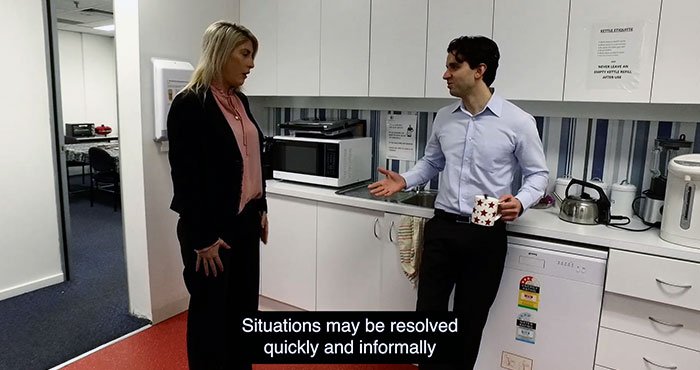
Captions can also reinforce spoken information and make training easier to follow when audio cannot be used.
Tips:
- Review automatically generated captions carefully for accuracy.
- Synchronise captions accurately with the audio.
- Include important sound cues where relevant.
- Make sure captions do not obscure important visual information.
Accurate captions can make training more flexible and accessible across different workplace environments.
Use Plain, Everyday Language
Training videos should communicate information clearly rather than rely on unnecessary technical language.
Where possible:
- Choose familiar words.
- Explain industry terminology.
- Keep sentences concise.
- Avoid unnecessary jargon.
- Use consistent terminology throughout the video.
If specialist terminology must be used, briefly explain what it means before continuing.
Clear, straightforward language can make training easier to understand for employees with different levels of experience and familiarity with the subject.
Present Information at a Comfortable Pace
Even well-written training can become difficult to follow if information is delivered too quickly. Employees may need time to read captions, observe demonstrations, process new concepts and connect information with workplace tasks.

A steady pace creates a more comfortable learning experience.
Tips:
- Pause briefly after important points.
- Avoid rushing voiceovers.
- Give viewers enough time to examine diagrams and demonstrations.
- Allow sufficient time for captions to be read.
Clear communication is often more valuable than delivering large amounts of information quickly.
Support Spoken Information With Strong Visuals
Combining spoken explanations with clear visual information can make training easier to follow and reinforce important instructions.

Where appropriate, use:
- Demonstrations
- Diagrams
- Process graphics
- Icons
- Labels
- On-screen summaries
For example, when explaining how to operate equipment, show each step while describing it verbally.
Using complementary visual and spoken information can help employees understand procedures and see how instructions apply in practice.
Choose Colours and Graphics Carefully
Visual design has a significant impact on accessibility. Poor colour choices or cluttered layouts can make information difficult to interpret.
Aim for:
- Strong contrast between text and backgrounds
- Readable font sizes
- Simple layouts
- Consistent visual design
- Clear labels and graphics
Avoid relying solely on colour to communicate important information. For example, instead of saying ‘Press the green button’, identify the control by both colour and label.
Thoughtful visual design helps keep important information clear and easier to interpret.
Support Employees With Different Language Backgrounds
Many Australian workplaces include employees from diverse cultural and linguistic backgrounds. Even when training is delivered in English, clear communication and strong visual demonstrations can make information easier to understand.

Helpful approaches include:
- Speaking clearly.
- Avoiding unnecessary slang.
- Using consistent terminology.
- Supporting explanations with demonstrations.
- Providing translated captions where appropriate.
Visual demonstrations can reinforce verbal instructions and provide additional context for employees who may be less familiar with the language used in the training.
Make Videos Easy to Access Across Different Devices
Employees do not always complete training at a desk.

Depending on their role, they may access videos on:
- Mobile phones
- Tablets
- Desktop computers
- Learning management systems
- Shared workplace devices
Training should remain clear and functional across the platforms employees use.
Tips:
- Ensure text remains readable on smaller screens.
- Test playback on multiple devices.
- Check that captions display correctly across different screen sizes.
- Optimise file sizes without compromising quality.
- Make sure the video works effectively within the organisation’s learning platform.
Accessible delivery can reduce technical barriers and make it easier for employees to complete training where and when it is required.
Break Complex Topics Into Smaller Lessons
Lengthy training sessions can make complex information harder to process. Instead of producing one extended video, divide larger subjects into smaller, focused modules.
For example:
Workplace Safety Training
- Site induction
- Personal protective equipment
- Hazard reporting
- Emergency procedures
- Incident response
This structure allows employees to complete training progressively while revisiting individual topics whenever needed.
Modular training can also simplify future updates because only the affected sections may need to be revised if procedures change.
Encourage Feedback From Employees
Accessibility is not a one-time achievement. Regular feedback can help identify areas where training could be clearer, easier to follow or more accessible.

Employees may be able to identify issues that production teams overlook, particularly when they have different roles, experiences or accessibility needs.
Tips:
- Ask employees whether the information was easy to understand.
- Check whether captions were accurate and easy to follow.
- Ask whether the pace was comfortable.
- Find out whether demonstrations were clear.
- Use feedback to guide future updates.
Regular feedback can help improve training content over time and ensure it continues to meet the needs of your workforce.
Final Thoughts
Making training videos accessible for all employees is about creating learning experiences that are clear, practical and easier to access. Captions, straightforward language, thoughtful visual design, appropriate pacing and flexible delivery can all help reduce barriers to workplace learning.
Accessibility should be considered from the planning stage through to production and ongoing review. When training is designed around the needs of the people who use it, employees can focus on understanding the information and applying it confidently in their roles.
Ready to Create Accessible Training Videos for Your Workforce?
At Channel 1 Creative Media, we help organisations produce training videos that are engaging, inclusive and accessible to a wide range of employees. From scripting and production through to captions, graphics and post-production, we create workplace training that communicates clearly while supporting different accessibility needs.
Call us on 0387430488 or visit our Contact Us page to discuss your next training video project. Our team can help you plan and produce accessible training content that communicates clearly across your workforce.